PySpark - Module 3: DataFrames and Spark SQL
Module 3: DataFrames and Spark SQL (in Databricks)
By now you have some understating of Spark and distributed computing. You know the RDDs, the importance of lazy evaluations as well as the reason why RDDs are fault tolerant.
You also have your Databricks workspace set up from the Getting Started guide, and you have run your first PySpark code in a notebook.
Today we will work in Databricks: what it offers and how to use it. Then we will run a few notebooks, make Spark DataFrames, and query them with Spark SQL.
Learning Outcomes
Understanding Databricks: Gain an overview of what Databricks is, including its features and benefits.
Accessing Databricks: Set up your free Databricks workspace for hands-on practice, following the Getting Started guide.
Working with Notebooks in Databricks: Learn how to create and run notebooks in Databricks, which are essential for executing code and managing workflows.
Creating Spark DataFrames: Understand how to create Spark DataFrames, a core component of working with data in Spark.
Querying Data with Spark SQL: Learn how to query data using Spark SQL, leveraging SQL-like syntax for data manipulation within Spark DataFrames.
Why Databricks?
- Cloud-native: works on any major cloud provider
- Data storage: store a broad range of data including structured, unstructured and streaming
- Governance and management: in-built security controls and governance
- Tools: wide range of production-ready data tooling from engineering to BI, AI and ML
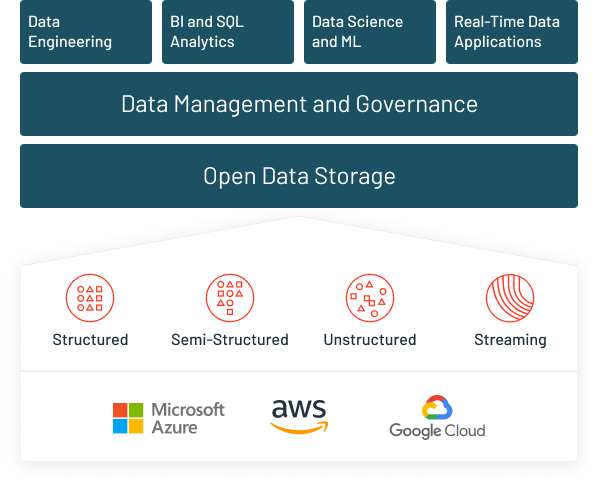
With Databricks Free Edition, we avoid installing and maintaining software, and we get the flexibility and features we will see in the next sections.
A non comprehensive list of benefits of Databricks:
1. Scalability and Performance
- Built on Apache Spark for efficient big data processing
- Seamlessly scales from small to large clusters
2. Unified Analytics Platform
- Integrates data engineering, data science, and machine learning
- Simplifies workflows and enhances team collaboration
3. Ease of Use
- Interactive workspace with collaborative notebooks
- Supports multiple languages: Python, SQL, R, Scala
4. Advanced Analytics and Machine Learning
- Robust support for machine learning and AI
- Includes MLflow for experiment tracking and model management
5. Data Lake Integration
- Supports Delta Lake for reliable data lakes
- Ensures ACID transactions and unifies batch and streaming data processing
6. Cloud Integration
- Seamless integration with AWS, Azure, and Google Cloud
- Leverages cloud-native features for security and cost efficiency
7. Real-Time Data Processing
- Handles real-time data streams for timely insights
- Essential for real-time analytics, monitoring, and fraud detection
8. Security and Compliance
- Robust security features including data encryption and role-based access control
- Compliance with various industry standards
9. Cost Efficiency
- Auto-scaling and optimized cluster management
- Efficient resource management reduces costs
10. Community and Ecosystem
- Large and active community with strong support
- Extensive documentation and third-party integrations
DataFrames and Spark SQL
Now that you have seen the benefits of running Spark on Databricks, open your Databricks Free Edition account if you have not already. The Getting Started on Databricks guide walks through it. Then work through section 0. Prep below.
Prep
- Before we dive into the detailed process of learning PySpark in the Databricks environment, I’d like you to watch this introductory video. It will provide you with a solid overview of what to expect and help you navigate the material more easily. Don’t worry about mastering everything in the video or practicing the content; it’s just a warm-up.
- [Introduction to Databricks notebooks] (https://learn.microsoft.com/en-us/azure/databricks/notebooks/)
- [Manage notebooks] (https://learn.microsoft.com/en-us/azure/databricks/notebooks/notebooks-manage)
- [Develop code in Databricks notebooks] (https://learn.microsoft.com/en-us/azure/databricks/notebooks/notebooks-code)
- [Databricks notebook interface and controls] (https://learn.microsoft.com/en-us/azure/databricks/notebooks/notebook-ui)
- Export and import Databricks notebooks
- Notebook outputs and results
- Dashboards in notebooks
- ipywidgets
- Run a Databricks notebook from another notebook, and see the bellow youtube.
- Now you know the essential procedures to work in Databricks environment. Now head towards the 00 - Test dev env notebook, clone it into your workspace and follow the steps. For consistency in the learning material and easy referencing rename the file to 00 - Test the dev env.
- Now clone 01 - Data Prep into your workspace. For consistency in the learning material and easy referencing rename the file to 01 - Data Prep.
Note: As you already know a good practice in programming is to modularize your code. Following the best practices here I have created a notebook called 02 - Functions. Clone that into you workspace, rename it to 02 - Functions, try to read through it, and make adjustments as needed.
Next, we will explore the fundamentals of DataFrames in Databricks. We’ll cover how to create and manipulate DataFrames, perform basic operations, and leverage DataFrames for data analysis. This session will guide you through using Spark SQL for querying and transforming data, demonstrating practical examples of DataFrame operations.
- Introduction to DataFrames
Clone this notebook. Rename the file to 03 - Introduction to DataFrames. Go through the material and try to make notes. The notebook covers few topics including:
- Difference between RDDs and DataFrames
- Creating DataFrames
- Schema inference and manual schema definition
Next we learned how to perform basic DataFrame operations including selecting, filtering, and transforming data using PySpark. These operations are fundamental for data manipulation and analysis. We will then learn how to perform aggregations and group data using PySpark. We covered how to group by single and multiple columns, apply multiple aggregate functions, and filter results after grouping.
We will then dive into working with joins and unions in Spark using Databricks. We’ll explore how to combine data from multiple DataFrames using different types of joins, including inner, left, right, and full outer joins. Additionally, we’ll cover how to use unions to append data from one DataFrame to another. These operations are fundamental for integrating and manipulating datasets in Spark, making them essential skills for any data engineer or analyst working in a distributed data environment.
Finally, in this module, we will learn few tips and tricks on how to work with semi-structured data. The focus is on handling JSON data, including how to read, write, and manipulate JSON files using PySpark. You will learn techniques to efficiently process semi-structured data, including using Spark’s explode function to flatten nested data and leveraging schema inference to automatically detect data structures. The module provides practical examples and exercises to solidify your understanding, ensuring you can effectively manage complex data formats in your projects.
DataFrame Operations
- Selecting, filtering, and transforming data: Follow this notebook. Referencing rename the file to 04 - DataFrame Operations.
- Aggregations and Grouping: Follow this notebook. For consistency in the learning material and easy referencing rename the file to 05 - Aggregations and Grouping.
- Joins and unions: Follow this notebook. For consistency in the learning material and easy referencing rename the file to 06 - Joins and Unions.
- Working with Semi-Structured Data: Follow this notebook. For consistency in the learning material and easy referencing rename the file to 07 - Working with semi-structured data.
Spark SQL
Spark SQL lets you query a DataFrame with plain SQL. It is not a separate engine: SQL and the DataFrame API compile to the same plan through Catalyst, so they run at the same speed and you can mix them freely. Use whichever reads more clearly for the task.
To query a DataFrame with SQL, register it as a temporary view, which gives it a name SQL can refer to:
orders.createOrReplaceTempView("orders")Then run SQL against that name.
spark.sql(...)returns a DataFrame, so the result is just another DataFrame you can keep working with:result = spark.sql(""" SELECT country, ROUND(SUM(amount), 2) AS total FROM orders GROUP BY country ORDER BY total DESC """) result.show()Because both sides are the same engine, the same grouping is identical whether you write it as SQL or as DataFrame code:
orders.groupBy("country").sum("amount")                               # DataFrame API
spark.sql("SELECT country, SUM(amount) FROM orders GROUP BY country")  # same plan
A temporary view lives only for your session. To keep a table that persists and that others can query, save it to Unity Catalog and read it back later:
orders.write.mode("overwrite").saveAsTable("workspace.default.orders")
spark.sql("SELECT country, SUM(amount) FROM workspace.default.orders GROUP BY country")
Try it yourself: Visualizations in Databricks notebooks
Databricks has built-in charts and visualizations in both Databricks SQL and notebooks. Based on the data prepared in 01 - Data Prep, make a few visualizations. This is optional practice to reinforce the material, not a graded hand-in.
Need a reference? See the Databricks visualizations docs.
Previous: Module 2: Spark Architecture and RDDs | Next: Module 4: Data Sources and Sinks