PySpark - Module 0.1: Getting Started on Databricks
Getting Started: Your Databricks Account
This course runs on Databricks Free Edition. It is free, runs in your browser, and needs no local installation. There is no Java or PATH to configure. Do this before the first session so we can start with Spark, not setup.
Step 1: Sign up and choose Free Edition
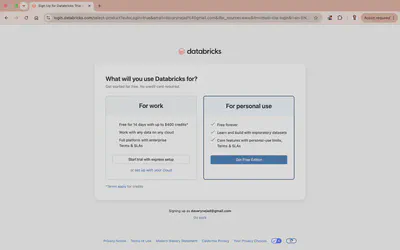
Start the sign-up at databricks.com. You will be asked what you will use Databricks for. Pick For personal use and click Get Free Edition.
This is the one step where it is easy to go wrong. Do not pick “For work”: that starts a 14-day trial that expires. Free Edition does not expire.
Step 2: Skip the onboarding questions
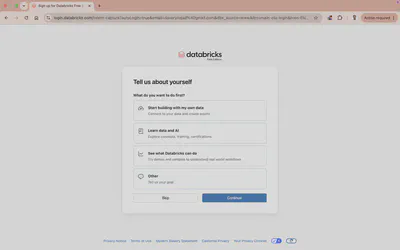
Databricks asks what you want to do first. Answer it or click Skip; it does not change your access.
Step 3: You are in
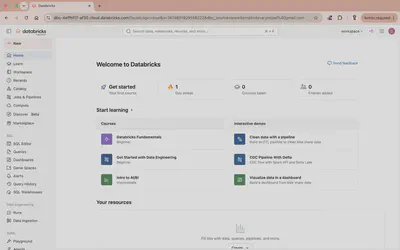
You land in your own workspace, with notebooks, compute, and the Jobs and Pipelines tools we use through the course.
Get to know the workspace
This course teaches the distributed computing ideas behind Spark. It does not spend time on where the buttons are, because Databricks already teaches that well and keeps it current.
Before the first session, spend twenty minutes in Databricks’ own onboarding. In your workspace, open Learn in the left sidebar, or the Get started panel on the home page. You will find short courses and interactive tours:
- A Workspace Tour of the home page, navigation, Catalog, and Compute.
- Get Started with Databricks Free Edition, which walks through Unity Catalog, uploading data, and the SQL editor.
- Short paths for Machine Learning, Data Engineering, and AI/BI, plus interactive demos.
Think of it as a division of labour: Databricks shows you how to drive the workspace, and this course explains what is happening underneath when your code runs across a cluster.
You can also reach these outside the workspace:
- Get Started with Databricks Free Edition (guided workshop)
- Databricks Academy: free self-paced training
Step 4: Confirm it works
Create a new notebook (New → Notebook) and run this in the first cell:
print(spark.range(5).count())
If it prints 5, Spark is running on serverless compute and you are ready. You never start a cluster yourself; Free Edition gives you serverless compute on demand.
What Free Edition runs, and what it does not
Free Edition gives you serverless compute, which runs on Spark Connect. That powers most of this course well, but a few things need a different setup. Here is a clear map of what runs where, so you do not lose time on something that cannot work here.
Runs well on Free Edition serverless: DataFrames, Spark SQL, and Structured Streaming. This is the core of the course and of the Spark certification.
| Capability | On Free Edition | What to do |
|---|---|---|
RDD API (sparkContext, .rdd) | Not available | Use the DataFrame API. RDDs are not exposed on Spark Connect. |
MLlib (pyspark.ml) | Works on environment version 4 | Switch the notebook to environment version 4. See Module 6 for the setup and its limits. |
| H2O Sparkling Water | Not available | It needs JVM access on the executors, which serverless blocks. Use classic compute (a Databricks trial or paid workspace with a standard cluster), or use MLlib instead. |
| Anything reaching the Spark JVM | Not available | Use DataFrame and Spark SQL, or move to classic compute. |
If you need the full Spark engine (RDDs, Sparkling Water, large models), create classic compute in a Databricks trial or paid workspace.
References
Working toward the certification
If you want a credential, this elective maps closely to the Databricks Certified Associate Developer for Apache Spark (Python, DataFrame-focused). The course covers Spark architecture, the DataFrame API and Spark SQL, data sources and sinks, and Structured Streaming, which is most of the exam. To be fully exam-ready, also work through the Spark Connect section in Module 2 and the Tuning Essentials page.